
The hidden cost of Microsoft Teams calling issues
How proactive monitoring changes the equation





Author: Tim Jalland,
Program Director,
VOSS Solutions
Tuesday March 03, 2026
With Microsoft Teams firmly established as the collaboration platform of choice for small, medium, and large organizations alike – now serving over 350 million active users – its role has expanded far beyond messaging and meetings. For many enterprises, Microsoft Teams Calling has become a critical business service, supporting customer engagement, partner collaboration, and day-to-day internal operations.
As reliance increases, so does the importance of ensuring that Teams Calling delivers a consistent, high-quality user experience. When voice quality degrades or calls fail, the impact is immediate and tangible – disrupting conversations, delaying decisions, and ultimately affecting productivity, customer satisfaction, and revenue.
However, Teams Calling does not operate in isolation. It depends on a chain of interconnected components, including:
- The user’s device and peripherals
- Local network and Wi-Fi conditions
- Corporate infrastructure and connectivity
- Microsoft 365 and Teams cloud services
- PSTN connectivity and carrier infrastructure
Each link in this chain must perform correctly. When one element fails or underperforms, the user experiences poor call quality – and identifying the root cause can be complex.
The operational burden of troubleshooting Teams Calling
When call quality issues occur, the most visible symptom is a support ticket. These tickets often require multiple diagnostic steps, cross-team collaboration, and specialist expertise to resolve. This consumes valuable IT resources and increases operational costs, but the true impact extends further.
Many users never report issues at all. Instead, they adapt – tolerating degraded service, avoiding calls, or switching to alternative communication methods. This “silent suffering” creates hidden productivity losses across the organization.
Industry experience suggests that unreported issues may outnumber reported tickets by a factor of five to ten. This means the visible support burden represents only a fraction of the true operational and business impact.
The Teams Calling maturity ladder: From reactive to proactive operations
Organizations typically address Teams Calling quality through a progression of operational maturity.
LEVEL 1.
Native Microsoft tools and analytics
Most organizations begin with the native tools available within the Microsoft ecosystem, using Teams Admin Center data and exporting telemetry into tools such as Power BI for analysis.
While valuable for reporting and trend analysis, these tools are primarily designed for analytics rather than operational monitoring. They help explain what has happened but provide limited capability to detect and resolve issues quickly – and even less ability to prevent them.
LEVEL 2.
Monitoring and reactive troubleshooting
The next step is implementing dedicated monitoring tools designed specifically for Teams Calling environments. These tools provide real-time visibility into call quality across users and locations, alerting when service degradation occurs, detailed diagnostic information across endpoints, networks, and services, and faster identification of root causes.
This significantly reduces troubleshooting time, improves user experience, and lowers the operational burden on IT teams. However, this approach remains largely reactive — responding after users have already experienced an issue.
LEVEL 3.
Proactive monitoring and synthetic testing
Organizations who adopt proactive monitoring tend to be the most mature. Rather than waiting for real users to encounter problems, proactive monitoring simulates user activity across the Teams ecosystem. Synthetic calls and automated tests continuously validate service health, identifying issues before they affect users.
This enables IT teams to detect degradation early, resolve issues before users are impacted, reduce support ticket volumes, improve service reliability and user confidence, and optimize resource utilization. Proactive monitoring shifts operations from reactive firefighting to controlled, predictable service management.
Examples of Proactive Monitoring
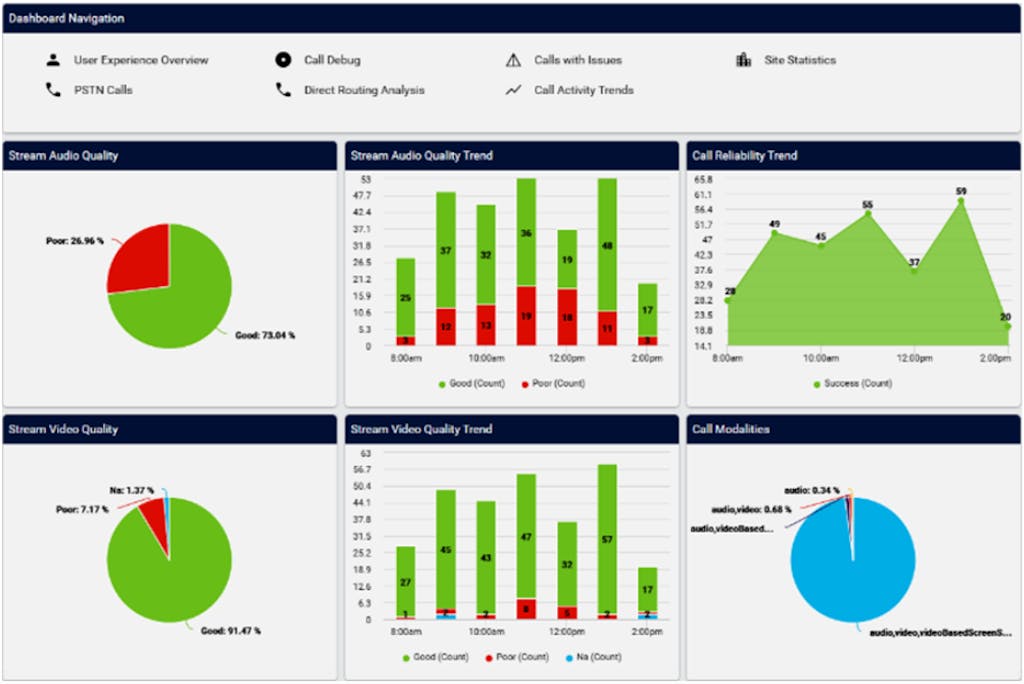
Top level quality indicators on a Microsoft Teams Phone service
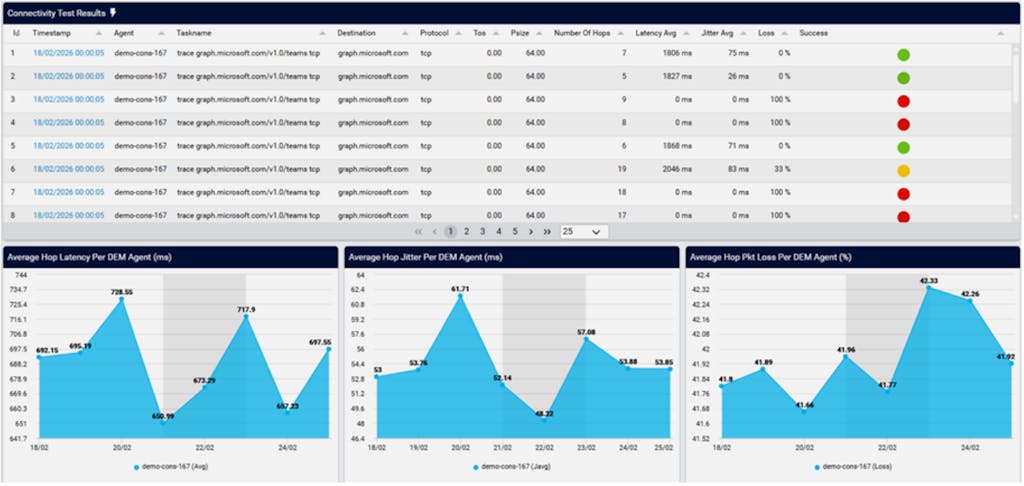
Proactive monitoring agents in action, illustrating tests running along with key quality metrics over time
Quantifying the business impact: Introducing the trouble ticket tamer
While the operational benefits of proactive monitoring are clear, many organizations struggle to quantify the financial impact. How much do Teams Calling issues really cost? And what is the measurable return on investing in proactive monitoring?
To answer this, Kevin Kieller of enableUC – a recognized Microsoft Teams expert with extensive customer experience – developed the Trouble Ticket Tamer model. This model quantifies the true cost of Teams Calling issues across three key dimensions:
- Lost productivity from affected users
- Lost revenue from disrupted customer interactions
- Additional IT labor required to diagnose and resolve issues
The model compares scenarios with and without proactive monitoring, revealing the potential cost savings and operational efficiency gains.
Explore your organization’s potential savings
The calculator allows you to enter key parameters specific to your organization, such as:
- Number of Teams Calling users
- Support ticket volumes
- IT labor costs
- Revenue per employee
Based on these four inputs, the tool estimates the true annual cost of Teams Calling issues, the hidden cost of unreported problems, and the operational savings achievable through proactive monitoring. For many organizations, the results reveal substantial hidden costs – and a compelling financial justification for improving monitoring maturity.
From reactive support to proactive service assurance
As Microsoft Teams becomes the primary voice platform for modern enterprises, maintaining call quality is no longer simply a technical concern – it is a business imperative. Organizations that rely solely on reactive troubleshooting incur hidden costs in productivity, support overhead, and lost business opportunity. By adopting proactive monitoring, enterprises can transform Teams Calling operations — improving reliability, reducing support burden, and protecting business performance.
The Trouble Ticket Tamer provides a clear, data-driven way to understand this impact and build a strong business case for proactive monitoring.
Discover more
Explore the Trouble Ticket Tamer calculator to understand the potential impact in your organization, or speak to VOSS to learn how proactive monitoring and analytics can help you deliver a reliable, high-quality Microsoft Teams Calling experience at scale.
Trouble Ticket Tamer
Simply enter your data and see how much you could be saving!
| Category | Without Proactive Monitoring | With Proactive Monitoring | Savings |
|---|
Model Development
Input for the detailed model that the Trouble Ticket Tamer is based on leveraged collective expertise of EnableUC, discussions with IT professionals responsible for managing Teams environments, and Microsoft MVPs (most valuable professionals), along with online research.
Sources of Teams Outages and Service Degradation
While creating the detailed model Trouble Ticket Tamer is based on, we identified 11 issue categories that can lead to Teams outages or degraded service. Each has a likelihood, impact scope, and potential for mitigation through proactive monitoring. We rated each category using our expertise, input from IT professionals and Microsoft MVPs, and online research.
| Source | Description | Availability | Disruption % | Impact Scope |
|---|---|---|---|---|
| Core services issues | The Teams service itself is covered by three different SLAs (Dec 1, 2024) 99.9% for chat and meetings, 99.999% for PSTN calls, auto attendants, and call queues, 99.9% “good” voice quality (VoIP or PSTN) | 99.99% | 0.01% | Broad |
| Supporting service issues | Even if Teams is “up”, occasionally supporting services, such as Active Directory (aka Entra) or MFA (multi-factor authentication) can prevent users from accessing Teams. | 99.99% | 0.01% | Broad |
| Hardware issues | Occasionally individual users experience hardware issues; these could be related to their laptop, headset, or external camera. | 99.99% | 0.01% | Individual |
| Software issues | More often other software running on a user’s laptop cause issues with Teams, either because CPU or memory resources are overloaded or because a video device is “in use” by another application. Pending Windows updates can also cause issues. | 99.95% | 0.05% | Individual |
| Human error causing configuration issue | Typically a misconfiguration, e.g. firewall rule, expired certificate. | 99.90% | 0.10% | Location (or Broad) |
| Network issues | Remote users may experience issues with their Internet provider. Occasionally office-based networks, especially WiFi may encounter problems. | 99.70% | 0.30% | Varies |
| Security issues | Cybersecurity issue - could impact entire org; disruption for security/Comms/PR because of this incident. | 99.90% | 0.10% | Location (or Broad) |
| Loss of power | Power disruptions due to scheduled maintenance or outages. | 99.90% | 0.10% | Varies |
| Physical infrastructure damage | Occasionally an office may be inaccessible due to construction, events, or accidents. | 99.98% | 0.02% | Location |
| Weather issues | Inability to physically access specific site. The United States has seen a 67% increase in major power outages from weather-related events since 2000. In 2023, the U.S. experienced 28 separate weather and climate disasters, resulting in $92 billion in damages. | 99.90% | 0.10% | Location |
| End-user error/issues | Primarily productivity degradation due to user training "blindspots"; no tickets because users don’t realize inefficiency. | 99% | 1.00% | Individual |
Mitigation Strategies
Based on our research, our model uses the following default values:
| Source | Primary Strategy | Secondary Strategy | Issues Avoided w/ Monitoring |
|---|---|---|---|
| Core services issues | Detect and communicate | 75% | |
| Supporting service issues | Detect and communicate | 75% | |
| Hardware issues | React efficiently | Detect and communicate | 5% |
| Software issues | React efficiently | Detect and communicate | 5% |
| Human error (config) | Detect and correct | Detect and communicate | 75% |
| Network issues | Detect and correct | Detect and communicate | 90% |
| Security issues | Detect and communicate | 50% | |
| Loss of power | Detect and communicate | 75% | |
| Physical damage | Detect and communicate | 80% | |
| Weather issues | Detect and communicate | 90% | |
| End-user error/issues* | Training | On-going training | 0% |
Mitigation Approaches
Detect and Correct: Synthetic transactions, utilized as part of proactive monitoring, can notify IT teams of potential issues before they impact end users. For instance, a misconfiguration that leads to an outage outside regular business hours may be identified in advance, allowing IT to diagnose and resolve the problem prior to the next work cycle.
Detect and Communicate: Proactive monitoring may also highlight widespread or location-specific incidents. While some challenges may fall outside IT's direct control, timely communication and suggested alternatives are essential. For example, rescheduling meetings if Teams is unavailable, leveraging alternative platforms such as Zoom or Webex (which many large organizations retain for such contingencies), or recommending temporary remote work arrangements can help mitigate disruption.
To maximize the effectiveness of mitigation strategies, preparatory measures should be undertaken. This includes user training on backup solutions (e.g., ensuring all personnel understand how to use mobile hotspots if their primary network is affected) and drafting preemptive communications for anticipated scenarios such as office closures resulting from weather, power outages, or physical infrastructure failures.
React Efficiently: Certain issues—primarily those related to individual hardware or software—may be challenging to avert entirely. The focus here should be rapid resolution, supported by advance planning such as maintaining an inventory of spare devices and components, as well as implementing proven processes for replacing hardware while safeguarding data and configurations. Organizations may also provide loaner laptops to maintain productivity while permanent replacements are arranged.
Keep up to date with our latest blogs and subscribe today