
USE CASE
Cost Analytics and Reports
Streamline costs and optimize asset utilization in complex UC networks
Creating a digital workplace environment
UC assets, including software licenses, devices, hardware, voice capacity, numbering, and specialized meeting room apps – can strain your budget. Calculating the costs and reporting of these assets is not straightforward, as cost analytics data is often scattered across multiple UC applications and comes in different formats. Plus, the data is constantly changing, with people joining and leaving the system regularly.
Investing in your company’s digital workplace drives productivity and collaboration, but sometimes, navigating the IT landscape can be complex. The digital workplace merges various systems; some are well-established and run in data centers, while others are newer cloud technologies like Microsoft Teams. Dealing with this mix can be challenging and costly as you strive to meet the needs of your users.


Organizations, especially those running multi-vendor UC&C environments, should evaluate VOSS Cost Analytics for its ability to provide unified visibility into UC&C deployments and utilization, as well as its capabilities to use visibility information to optimize and reduce operating costs.
Irwin Lazar
President and Principal Analyst for Metrigy

VOSS cost analytics and management
VOSS untangles this complexity, providing a clear window into asset utilization and spending, and giving valuable insights into how your resources are being used. In this way, you can optimize your investments and make informed decisions that enhance your company’s efficiency and cost-effectiveness.
By connecting VOSS into your UC network, you unlock a single point of control for discovery, analysis, trending, and reporting on the use of assets. VOSS can be configured to track assets that include telephone numbers, licensing, devices, and capacity, across the various UC components. And, business dashboards and cost reports can be adapted to meet specific business requirements.
Use VOSS to:

Cut monthly operating costs

Cleanse your data during migration

Optimize licences and assets

Adjust capacity of DIDs and lines

Rationalize and redesign office locations
VOSS cost analytics has saved me thousands of dollars in one year through unused number, capacity and asset analysis.
Large Government Department
VOSS Benefits
Sample business dashboards
VOSS cost analytics is configured to your specific requirements. The charts below are samples and show VOSS cost analytics reports at work within a UC network.
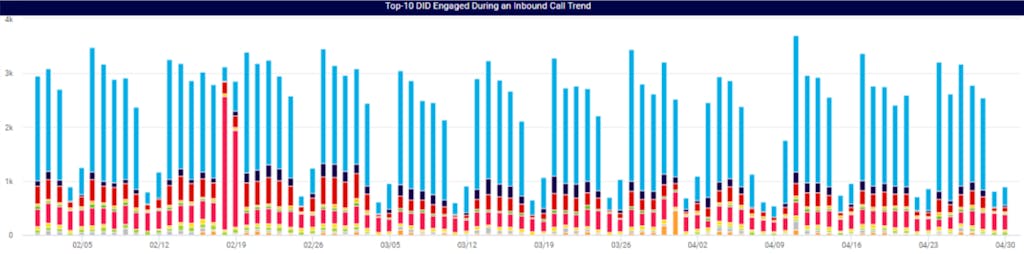
In this example, VOSS is tracking call volumes and related phone numbers (DIDs), prompting actions to optimize number ranges and capacity at specific sites, leading to monthly operational cost savings.
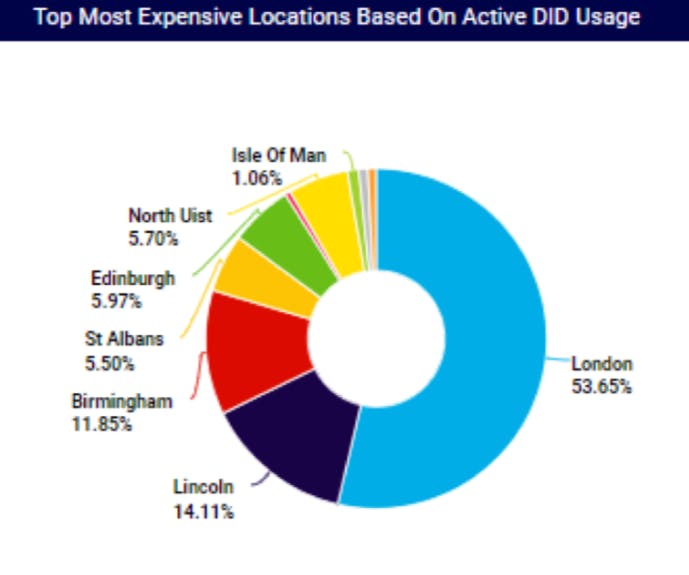
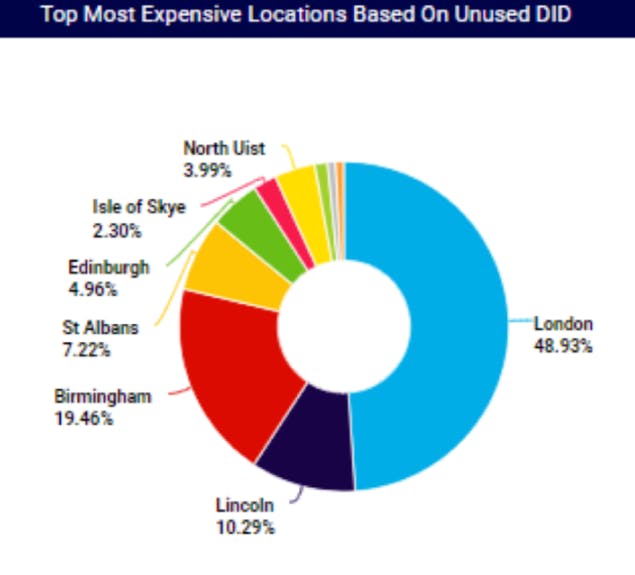
Discovery and analytics from Cisco Call Records (CDRs) indicate usage (call activity) by number and location, snapshot and trending.
The business dashboard below shows the translation of call usage, along with location information, DID ranges and cost points, summarized onto a dashboard for review – indicating cost reports by consumption by active numbers in each site; cost consumption by unused numbers (identifying possible cost savings or plans for cost avoidance).
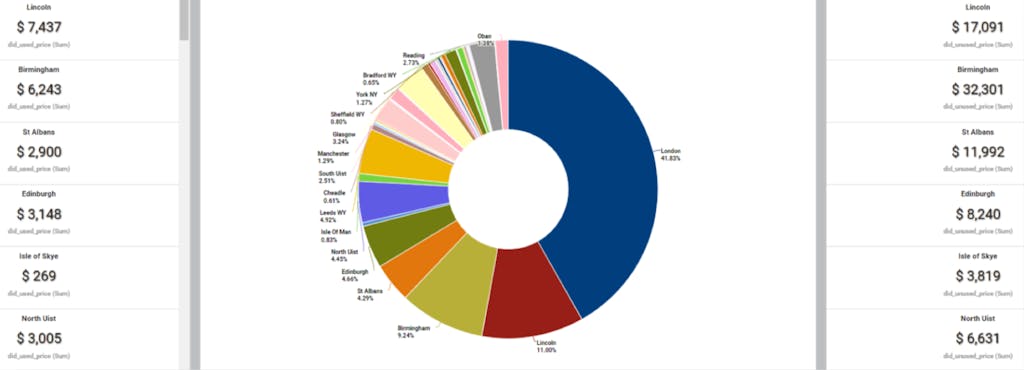
Where required, detailed information that can be filtered or searched – for example, a window into call usage at a particular site, DID range or cost consumption levels.
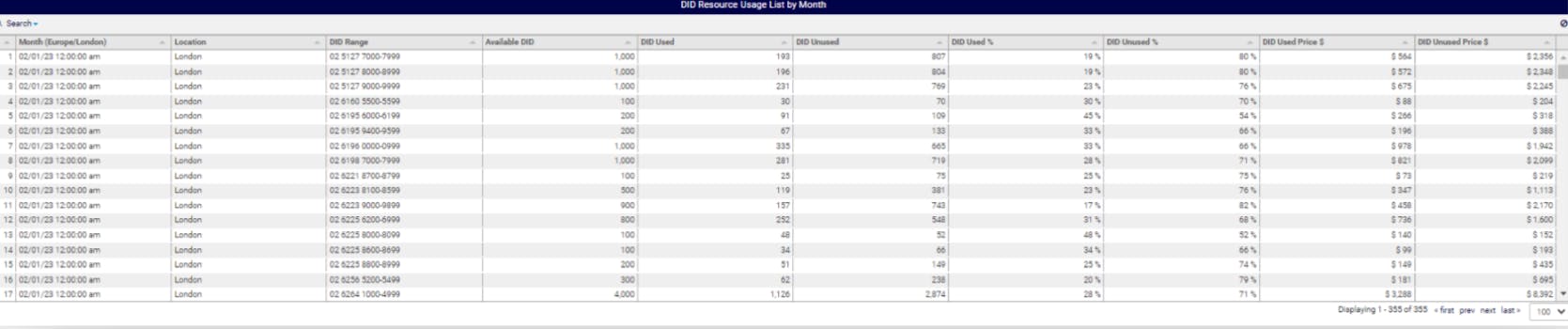
Sample dashboard scenarios
| Discovery and cost analysis with business logic | Ingest historical and live usage data (call records) to discover key UC assets, including numbering. Incorporate business logic and cost elements to create cost analytics and categorize by location into used and unused assets, identifying cost reduction opportunities. |
| Business dashboards highlighting key information | Visualize information in easy-to-understand dashboards, highlighting key information, trends, and points of note. Utilize various chart types (pie, column/bar, line/area, scatter, geo-map, heat-map, chord, funnel, gauge), color palettes, and tables (for detailed information). |
| Single view, multi-vendor, data center and cloud | Collect, process, and consolidate data at scale from a variety of sources, along with business logic, to present information on dashboards and reports, for review and then action:
|
| Drill down reporting to get to the detail | Start at the dashboard’s top level, then filter and drill into an office, department, or specific user to access more detail. Access top level charts and summaries, down to individual usage records. |
| Historical data coupled with live trending information | Load historical usage data (from call records) into the platform to provide immediate information, presented on dashboards. Live information can be collected from various systems, as it happens, providing up-to-date information and insight into trends and patterns. |
| Automation for accurate and speedy provisioning | Introduce automation to ensure the accurate and timely provisioning of new UC elements without over-provisioning or creating excess capacity or licensing, including accurate number inventory information. |
| Flexibility to adapt to your business requirements | Tune existing dashboards and reports with complete flexibility to suit specific business requirements from within the application, and create new dashboards and reports for specific needs. |
| Scheduled reporting to keep informed | Build and schedule reports for regular distribution and review. |
VOSS platform: Your digital workplace automation solution
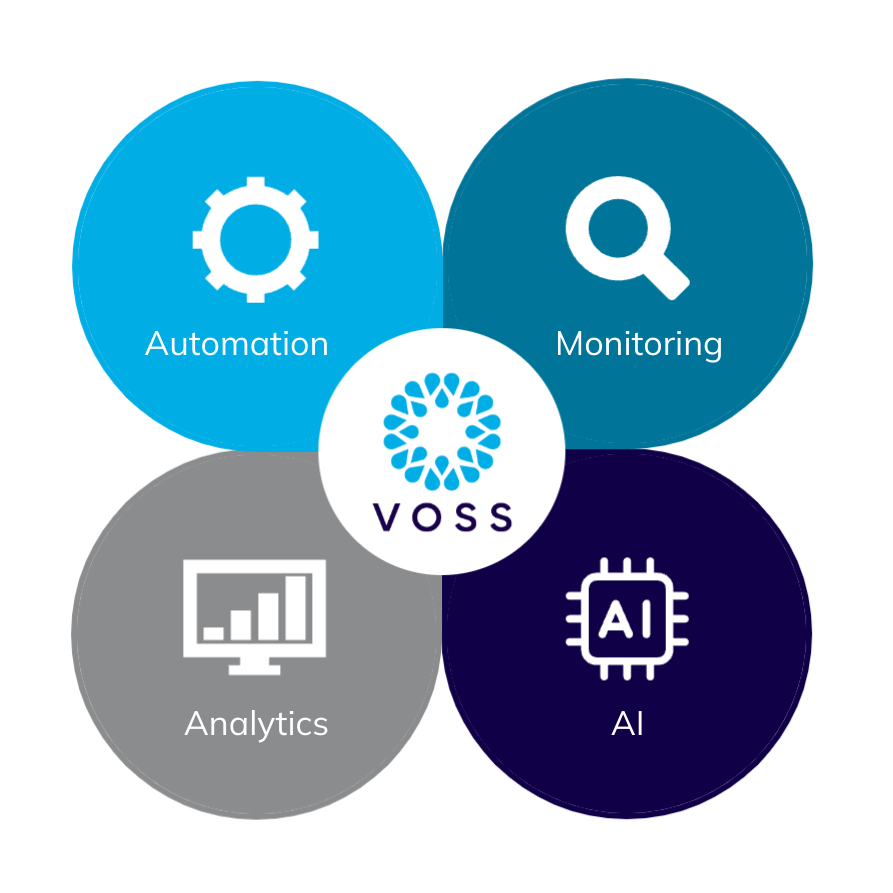
The VOSS platform serves as a powerful, ready-to-use automation layer that seamlessly integrates into your enterprise automation strategy. Acting as a digital workplace automation fabric, it spans key areas such as unified communications (UC), collaboration, security, licensing, meeting rooms, contact centers, email, and AI agents.
With its unified architecture, the VOSS platform delivers four critical capabilities:
- Automation: Comprehensive end-to-end orchestration for provisioning, lifecycle management, and remediation.
- Monitoring: Real-time visibility into service quality, performance, and user experience.
- Analytics: Actionable insights into usage, adoption, and costs to drive optimization.
- AI: Intelligent automation for troubleshooting, proactive actions, and closed-loop remediation.
Together, these capabilities enable scalable, resilient automation across multi-vendor environments—eliminating the need for fragile scripts or disconnected tools.