Making the digital workplace a success without breaking the bank
Understanding user needs, capacity, resources, and cost to balance a UC budget

Author: Tim Jalland
Solution Manager, VOSS Solutions
Thursday, April 18, 2024
It was interesting to see the new feature update from Microsoft on UC Today, allowing users to ‘book a phone’ from Microsoft Teams. It’s for hot desking, as users drop into the office, and really simplifies the process of working flexibly for users. Rollout starts in May 2024.
“Microsoft Teams Feature ID: 314430: Bookable desks. With the bookable desks feature in Teams, users can reserve desks upon arrival by plugging in to shared desks.”
The question it raises for IT Managers is whether this investment in the digital workplace will be fully utilized and beneficial, or whether it will represent more ongoing cost in unused assets and support. This brings us back to the topic of cost analytics, and how to ensure UC solutions live up to their promise whilst keeping monthly operating bills under control.
Where to get started
When it comes to UC, it’s important to track adoption (who is using it), usage (how much they are using it), and related cost streams (how much it costs) on an ongoing basis, to keep everything in balance. The starting point is to focus on the top 5 items that make up most of the budget, then review usage. If the result is not what’s expected, then it is either an adoption/usage problem, or it’s related to cost associated with unnecessary capacity. Below, you will find a list of top items to consider, which is then illustrated with tracking dashboards from VOSS Insights.
1) Licenses and usage
Taking Microsoft 365 and Teams as an example, user licensing costs can range anywhere from $20 to $100 per user per month. The cost continues to grow, with the introduction of numerous add-ons; Teams Premium and Co-Pilot being two examples. That makes it important to track usage and adoption, to ensure features are being used and the solution isn’t over licensed. We’ve written a specific blog on the topic, here.
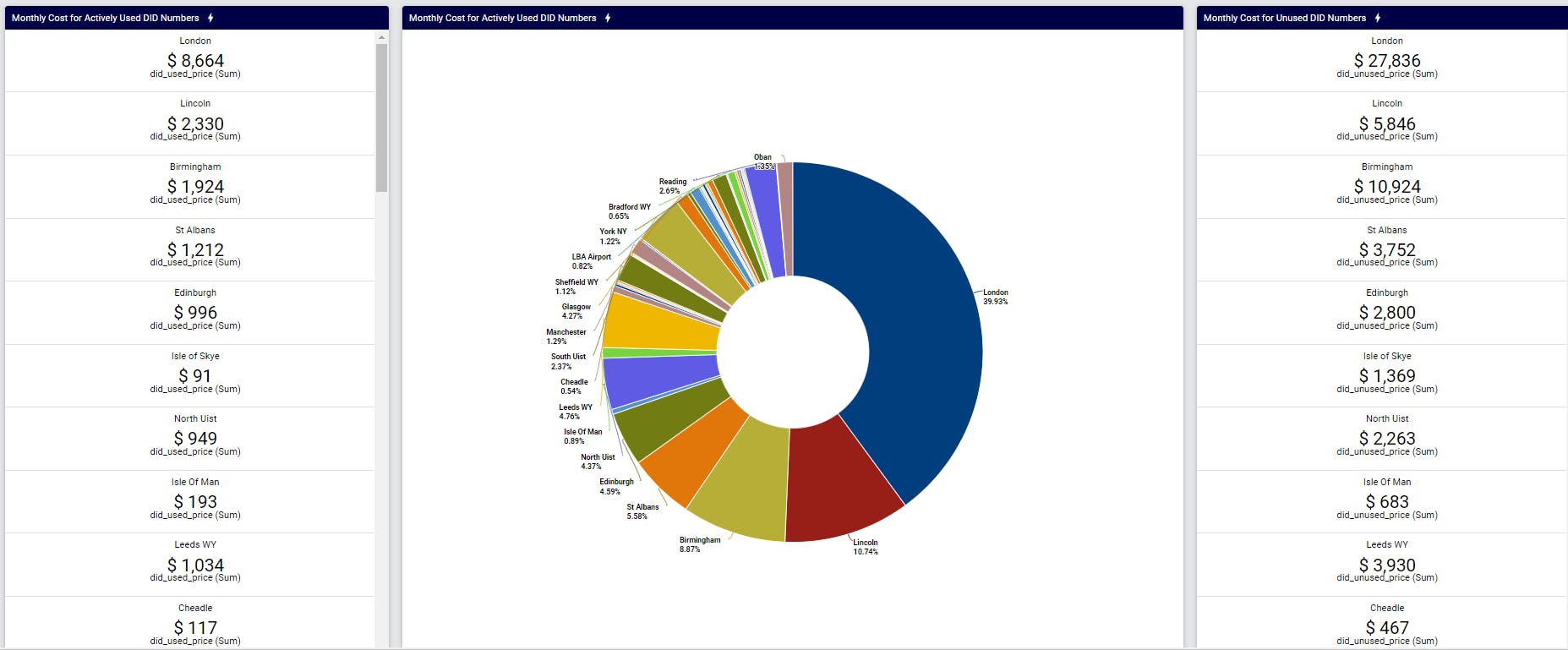
2) Telephony DIDs and capacity
Over recent years, the workplace has transformed. Gone are the days of a permanent desk with a phone and direct number to reach you. Organizations are using platforms such as Microsoft Teams to call directly between colleagues, and, in the process, are scaling back on traditional telephony capacity, allocated PSTN telephone number ranges, and operator contracts. The monthly savings can be significant.
3) Real-estate and associated facilities
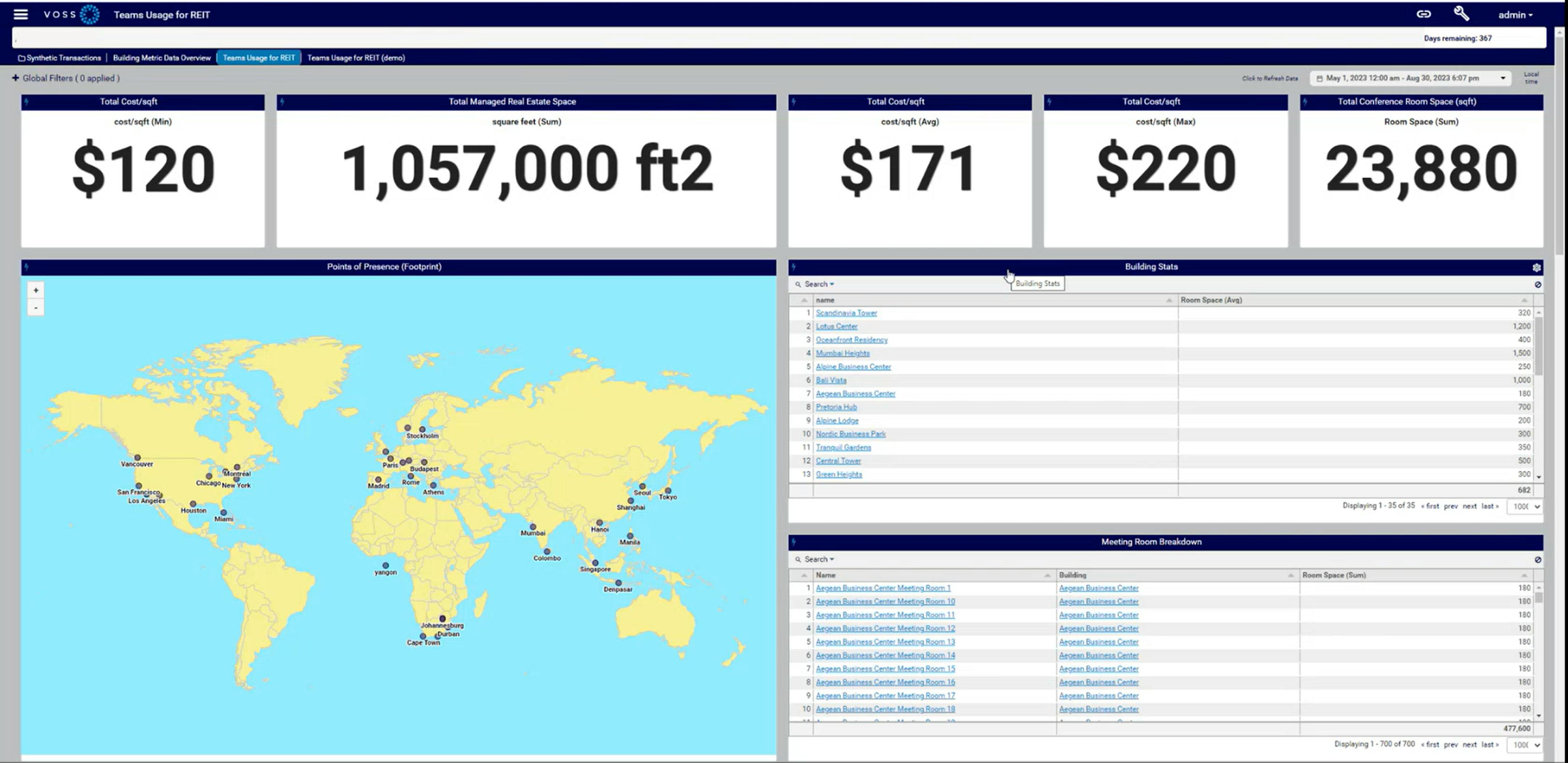
Along with the above workplace transformation has been an equivalent transformation and reduction in real-estate requirements. Hybrid working has reduced the demand on real-estate capacity and physically allocated desk space. It has raised new requirements for dropdown zones, huddle spaces, and conference meeting rooms, to meet the needs of agile workers and teams. This reconfiguration results in a facilities investment made by the company. It’s important to track metrics such as occupancy, usage, and adoption – taking action as necessary to ensure needs are closely balanced with cost.
4) Resourcing
The existing team charged with operating and delivering the UC service is a given. The point to note is the increasing workload on those resources which is driven from the growing complexity and sophistication of cloud UC platforms as they continue to develop. This builds a pressure point that calls for more resources which can be difficult to find … and expensive. The strategic approach is to invest in further automation, to remove the regular day-to-day load of service requests and changes from the team and deliver them through workflow automation.
5) Legacy systems
The final topic is legacy systems and associated licensing. With many organizations transforming to the cloud and migrating from older platforms, the identification and retirement of old user accounts, devices, and licenses is important so as not to double pay on both sides for a user. This piece is often overlooked during a migration program and drives completely unnecessary costs.
Balancing the books with VOSS Insights
On a typical project, existing IT collaboration costs can be streamlined saving up to 20%, by balancing needs, usage/adoption, and spend. On a monthly basis, that soon adds up to a significant saving in the annual budget.
To realize this, we recommend you run a cost analytics project. This involves the deployment of valuable tools, such as VOSS Insights, to track the above cost items over a suitable time period – at least three months. Then, balance the books to release savings that can be reinvested into future strategic projects around the digital workplace.
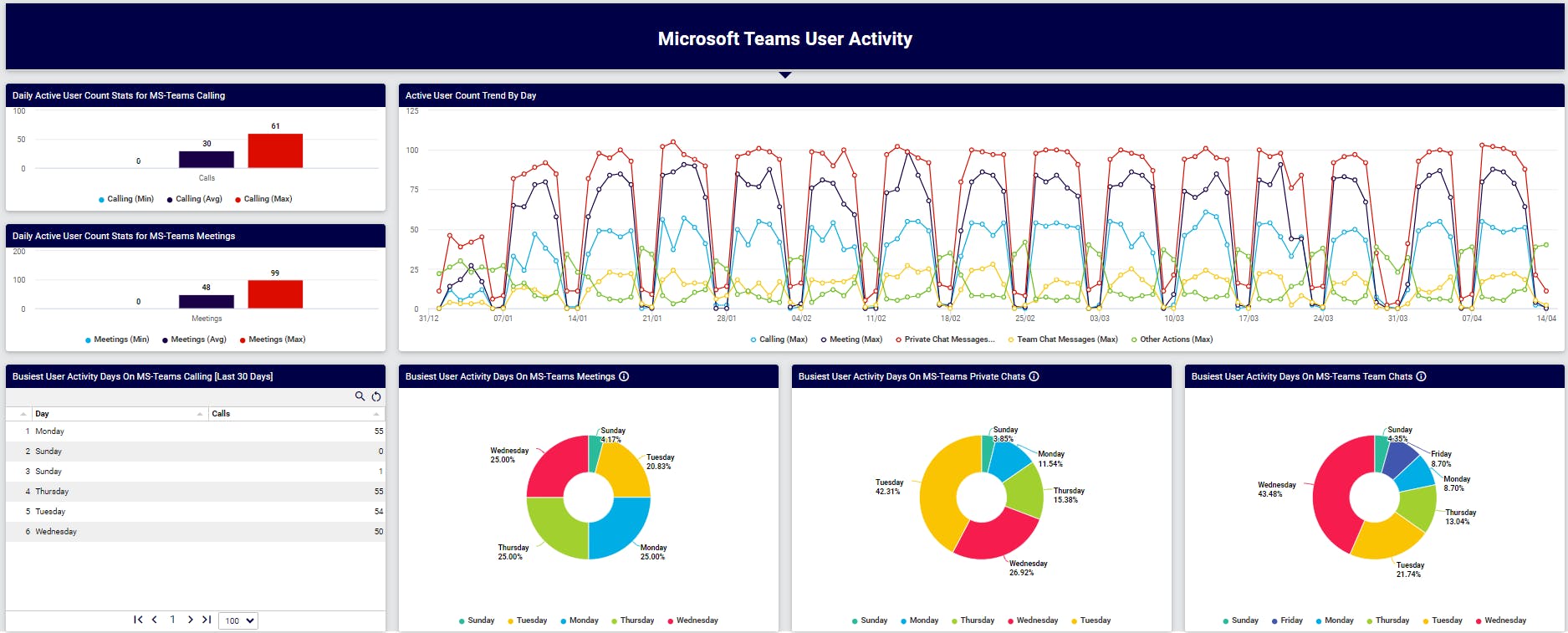
I’ve included here a usage chart for users on a Microsoft Teams collaboration solution, along with cost charts for telephony (PSTN) calling, and real-estate. Both of the cost charts are designed to track capacity against usage and highlight possible monthly cost savings.
Tracking User Activity and Usage of a Microsoft Teams Solution
Cost Tracking – PSTN Capacity (Trunks and DIDs)
Cost – Tracking Real-Estate – Footprint vs. Occupancy
Keep up to date with our latest blogs and subscribe today