
Streamlining Microsoft Teams Phone Management with ServiceNow and VOSS Automation

Author: Tim Jalland
Solution Manager, VOSS Solutions
Tuesday, August 20, 2024
Managing large-scale UC deployments can be a complex and resource-intensive process, particularly when it comes to day-to-day activities like setting up telephone numbers, assigning voice policies, and onboarding new employees. For many organizations, ServiceNow serves as the backbone for these tasks, offering a familiar platform to manage many business processes. However, despite its widespread use, many companies still rely on manual steps to execute service requests, leading to delays, errors, and unnecessary workload on the helpdesk.
What if you could automate these processes, and integrate directly with ServiceNow and with Microsoft Teams Phone? This is where VOSS automation comes in, transforming the way organizations manage UC deployments.
The power of automation: Simplifying complex workflows
In many businesses, service requests are initiated through ServiceNow’s product catalog, allowing users and managers to request services easily. Traditionally, these requests would be routed to the IT service desk for implementation, involving multiple manual touchpoints that require privileged access and are prone to error. VOSS automation eliminates these inefficiencies by directly integrating with the VOSS API at the right point in each business process.
Here’s how it works:
- Automated workflow integration – Instead of sending service requests to the service desk, they are automatically forwarded to the VOSS API.
- Task breakdown and execution – VOSS breaks down the requests into manageable tasks and executes them on the Microsoft Teams Phone system.
- Real-time updates – The business process receives regular status updates, keeping all stakeholders informed until the request is fully completed.
- Audit and reporting – All actions and commands are logged within the VOSS transaction log, ensuring a transparent audit trail and compliance with SLAs.
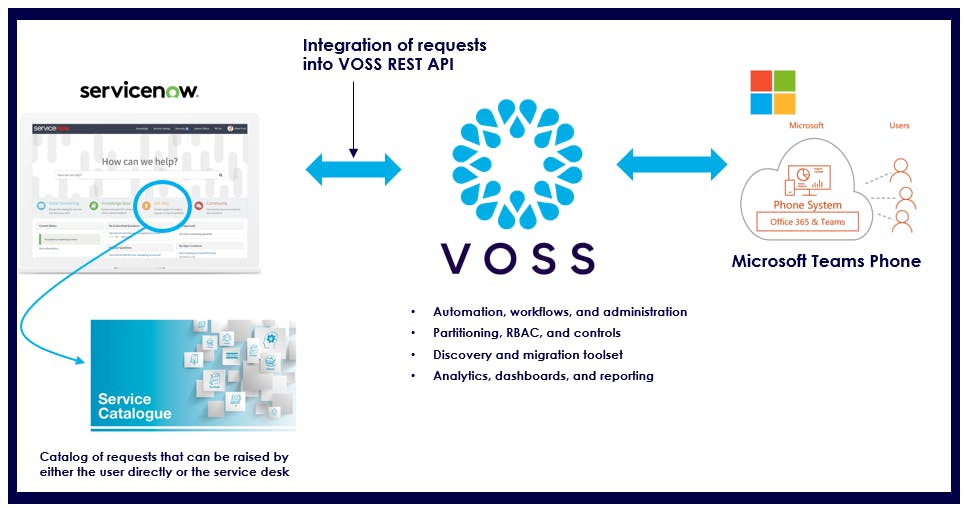
Key benefits of integrating ServiceNow with VOSS automation
Automating these processes offers a range of significant benefits:
- Enhanced user experience – Users can continue to make requests through familiar platforms, minimizing the learning curve and improving satisfaction.
- Improved service quality and operational efficiency – Automation reduces manual tasks, lowers error rates, and frees up helpdesk resources to focus on complex issues.
- Increased transparency and trust – Consistent updates and detailed logs enhance user trust and ensure compliance with SLAs.
- Seamless and secure integration – The system integrates smoothly with existing processes through a secure RESTful API, maintaining business continuity.
- Flexibility and scalability – Highly configurable to meet diverse service desk needs, accommodating a broad range of use cases.
A case study in efficiency: Real-world impact
To illustrate the impact of VOSS automation, consider a recent project with a large enterprise customer managing 30,000 users. Prior to automation, the service desk was overwhelmed with approximately 1,000 daily service requests. With VOSS automation in place, this workload was reduced to just six requests per day – a dramatic reduction that not only increased efficiency but also freed up service desk resources to concentrate on more complex, value-added tasks.
Next steps
VOSS Automate is more than just a tool – it’s a transformative solution for organizations looking to enhance their UC management capabilities. By providing a single pane of glass for managing all UC applications, including Microsoft Teams, Cisco, and others, VOSS empowers businesses to streamline operations, reduce errors, and significantly improve service response times.
As demonstrated in the case study, the benefits of automating Microsoft Teams Phone management are clear. By leveraging VOSS automation alongside ServiceNow, organizations can achieve a more efficient, reliable, and scalable approach to UC management, ultimately leading to better outcomes for both IT teams and end-users.
Keep up to date with our latest blogs and subscribe today