
A Case Study: Delivering Microsoft Teams Phone to a Large Government Customer
How a federal agency adopted a new telephony solution from a single, hyperscale Microsoft 365 tenant

Author: Tim Jalland
Solution Manager, VOSS Solutions
Tuesday March 26, 2024
Managing a successful migration and delivery of Microsoft Teams Phone isn’t always a straightforward project, especially when you’re dealing with a large government organization that comprises multiple smaller agencies or departments, running telephony on older PBX systems, and moving to a single Microsoft Teams tenant.
Here at VOSS, we have just completed a successful service delivery for a large US government organization with 150,000 users. Below, I explain how we approached this latest customer deployment.
The specific challenges came down to:
- The single tenant: Benefiting from economies of scale, but how to sub-divide this into services that can be successfully delivered into each agency?
- The mix: Coping with the fact that each agency has different drivers and requirements that inevitably lead to different flavors in the service being delivered; all from a single Microsoft tenant.
- The scale: The tenant is hosting over 100,000 users and a similar number of telephone numbers, plus multiple operator connections and half a million Azure groups and teams.
- Navigating the technical complexity: At this scale, onboarding technical experts within each agency or recruiting a central IT team to service and manage the tenant isn’t a practical or cost effective approach.
- The two-system-syndrome: Telephony was already being provided by an existing Cisco PBX multi-cluster system and that needed to co-exist with Microsoft Teams Phone for the duration of the transition period.
The project was delivered on the customer’s VOSS Automate provisioning platform that was already in use for managing the existing Cisco PBX . This brought confidence that the scale and complexity of the service would not be insurmountable.
The organization was able to use the same provisioning platform to manage Microsoft Teams Phone, which also brought benefits. Service administration and regular changes – such as the onboarding of a new user or the migration of an existing user – could be managed through the existing multi-vendor VOSS portal using the same interface and workflows. That meant a fast ramp up onto Microsoft Teams Phone without the need for retraining service desk agents on Microsoft technology or new administration portals.
The single tenant problem
There is no doubt that government organizations are adopting Microsoft Teams as their core collaboration platform and with that, are starting to migrate older telephony systems onto Microsoft Teams Phone. The benefits in terms of productivity, standardization, digitization, and cost streamlining are significant. However, delivery nearly always takes place from a single Microsoft 365 ‘super’ tenant and with that comes the challenge of delivering services out to individual government agencies; each with their own nuances and requirements.
In this case, the organization had over 1,000 administrators spread across multiple agencies. Therefore, providing them access to make changes directly through the Microsoft 365, Azure and Teams admin centers, with visibility to all users and related service configuration across all agencies, was not feasible.
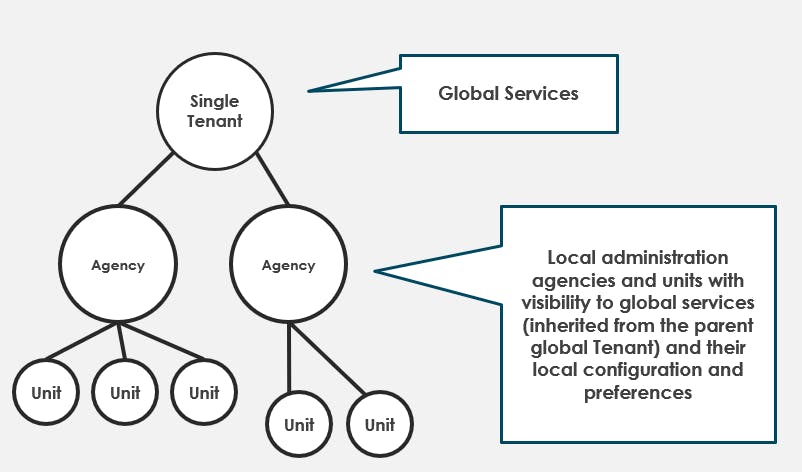
VOSS overcame this challenge through an inbuilt hierarchy – the ability to divide the tenant into subunits, each with its own services, users, telephony numbers, and devices. Each individual agency could then inherit service definitions from the global single tenant whilst also adding its own customization and preferences to meet specific needs: The best of both worlds.
Integral to the success of the above strategy was the ability to report consumption at a unit level, to accurately raise usage charges against each agency in a timely and automated fashion.
Managing the mix
Inevitably in these scenarios, there is a mix of vendors, technologies, and operator services under management. This project was no exception. It included the existing Cisco PBX (several clusters), Microsoft Teams Phone, Microsoft calling plans, Teams Phone Mobile, Operator Connect, and two operators providing PSTN access.
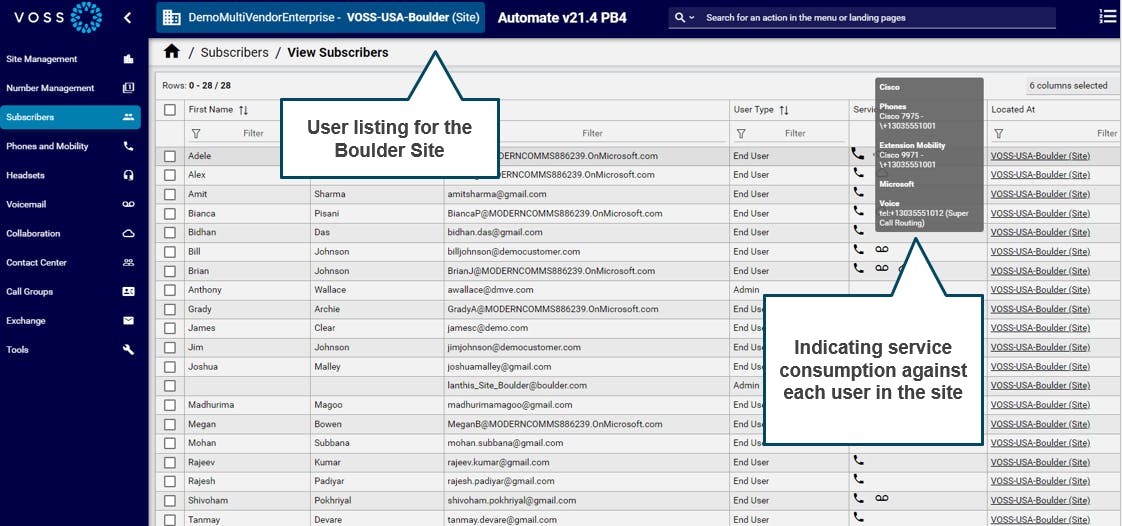
Managing the mix is taken care of by VOSS Automate in a single portal, providing a consistent view across the multitude of users, services, and numbers. Below you will see this at a site level, showing users with their devices and services, split across the existing PBX system and Microsoft Teams Phone.
The sheer scale
Next, we turned to the question of how to manage the scale of the solution, along with the number of administrators able to manage the service that were dispersed across various agencies and departments. The answer was to make use of the existing multi-node administration solution, hosted in different physical locations. This provided sufficient compute power along with a robustness should a particular location go offline.
Extending the solution to bring in Microsoft Teams Phone proved cost efficient, and the introduction was fast. The hierarchy concept described earlier provided a way to segment, filter, and navigate the vast number of users. Enhancements on existing workflows to cater for Microsoft Teams helped minimize training to the existing service agents who were managing the service.
Navigating the technical complexity
Each agency runs a local service desk, with agents to manage the day-to-day flow of inbound requests. For tasks such as managing new joiners and leavers, manually working through the various vendor portals, running scripts such as Microsoft PowerShell, and the deep technical training that would be required on Microsoft technology, was not considered a viable solution for the introduction of Microsoft Teams Phone.
The solution was to:
- Keep things in scope, each service desk agent was provided access only to their respective unit – at a specific node in the hierarchy described above – and only had access to the users, telephone numbers, devices, and services in their respective unit.
- Configure a specific role definition for the service desk agent, that is aligned with their responsibilities, only allowing access and visibility to the set of parameters and controls that were in scope for regular moves, adds and changes within their unit.
- Automate and streamline service changes, through a mix of workflows (that manage the multi-step manual process), configuration templates (that provide a level of standardization, with flexibility to meet local needs), and transaction logging (to provide a clear and recorded audit of all changes that have been made).
Managing the two system syndrome
Managing an existing PBX system, which is multi-cluster and has a significant base of users and services, and then picking out departments to move on a schedule, is no mean feat. The crux point comes mid-migration, with users on both sides: Those waiting to migrate, and those migrated. Both systems need managing, operating, handling moves, adds, and changes.
The critical points on the solution were to:
- Run a discovery at the start of the migration project, to ensure there was good visibility into the existing PBX configuration, with the opportunity to clean up and trim back old configuration, thus streamlining the process and reducing license costs.
- Take advantage of the single portal view that straddles both sides, to provide a unified view of all users within the migration process. That was then coupled with migration ‘workflows’ that could move a user from Cisco to Microsoft Teams Phone.
- Regular synchronization with the underlying UC applications. In this case, Cisco and Microsoft Teams, to ensure that all information presented was accurate and up-to-date.
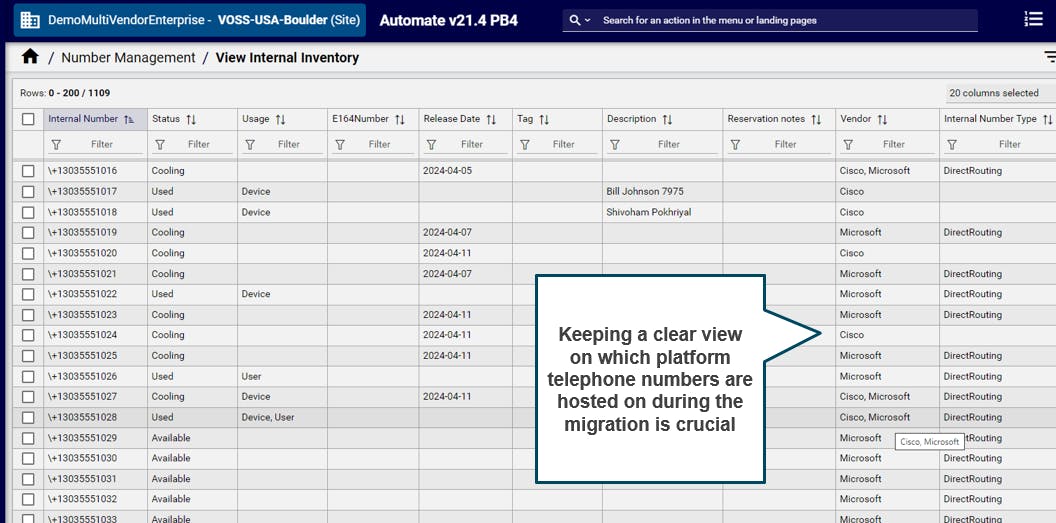
- Tracking telephone number inventory, what’s available and what’s used, who telephone numbers are allocated to, and what vendor system they reside on. Here is a sample screen shot from the VOSS Automate number inventory option, showing this:
More information
Carrying out a project of this scale is exactly what VOSS technology is built for. It’s exciting to solve a customer’s problems at such a grand scale, and we look forward to seeing the advancements that this dynamic UC platform takes in the coming years.
Find out more about VOSS for Microsoft or contact us.
Keep up to date with our latest blogs and subscribe today