
Star Trek and Boldly Going to Teams Phone
Star Trek and Boldly Going to Teams Phone


Guest Author: Kevin Kieller
EnableUC
Friday, May 17, 2024
(Article originally posted on LinkedIn)
There have been many different Star Trek series since the original series from 1966 (coincidentally the year I was born). According to Copilot, there are 12 Star Trek television series that created 905 episodes across 47 seasons of television; although I would always double-check the AI math. In any event, there are lots of Star Trek episodes.
Right now I am watching episodes of Discovery. Discovery begins a decade before the original Star Trek which was set in the 23rd century. At the end of the second season of Discovery, they travel to the 32nd century which is the setting for subsequent seasons.
Teams Phone has also had lots of series: LCS (although admittedly without real phone features), OCS, OCS R2 (where Microsoft really provided a PBX for the first time), Lync, Skype for Business, and then Teams (and now the new Teams client).
Like Star Trek, with different series, Microsoft voice, with its different versions, has seen ups and downs.
For organizations that have decided to boldly go where many have gone before (active Teams Phone usage is up to 20 million users) it turns out that discovery is hard.
In the Star Trek series Discovery the crew is inevitably confronted by some unique astrophysical phenomenon that can’t be scanned. It turns out that nebulas, dense asteroid fields, and subspace anomalies can all disrupt or block long-range sensors.
Many organizations planning to migrate to Teams underestimate the challenge of understanding (scanning) and migrating legacy PBX configurations to Teams.
Legacy PBXs often have been deployed for years, sometimes tens of years. Over this time the configuration has evolved and changed with the organization. Perhaps the staff that initially installed some of the PBXs is no longer available. A lack of insight into the existing PBX set-up introduces risk, unnecessary cost, user disappointment, and support issues into the migration project.
While it is possible to manually canvas subject matter experts within your organization and manually extract configuration information from legacy PBXs, this is a time-consuming process. Even when complete, there is a need to consolidate and map current configurations to a new Teams Phone configuration, and this is often not a direct 1-to-1 mapping.
Fortunately there are tools that make this process easier. One such tool is VOSS Discover.
Boosting Power to Long-range Sensors
In many Discovery episodes the captain asks something such as “can we compensate for the distortion or boost power to long-range sensors?”. Of course, when you need long-range sensors you need them quickly. VOSS Discover is like a boost of power and automates the collection of key data from legacy PBXs. Automation helps you complete your “scan” before you get sucked into a space-time, or project, anomaly.
VOSS Discover is a set of tools supported by engineering expertise focused on boosting power for three specific outcomes:
- Understanding your existing PBX configuration and inventory detail.
- Using usage data to be able to optimize users, devices, and numbers that need to be migrated saving both time and money.
- Creating a migration mapping that helps understand how to move features from where you are to Microsoft Teams, including highlighting specific feature mappings that may pose problems.
Non-disruptive Data Extraction
The VOSS Discover tool allows you to extract data from your existing PBXs, audit, analyze, and normalize this data.
What I learned from Star Trek: Discovery is that inevitably something happens to take your engines (their spore drive) offline. It could be a subspace rift, or any number of unique astrophysical phenomena. Interacting with production systems carries some risk.
This is why I like the approach of VOSS Discover that relies on backups or configuration exports from existing PBXs. This is a non-disruptive, secure process that does not connect to or interfere with any live running voice services. Cisco, Avaya, and Skype for Business Servers are popular legacy PBXs supported (VOSS notes that several additional PBXs are supported).
VOSS Discover ingests and creates detailed PBX inventory reports providing an overview of sites, users, numbers, extensions, and devices.
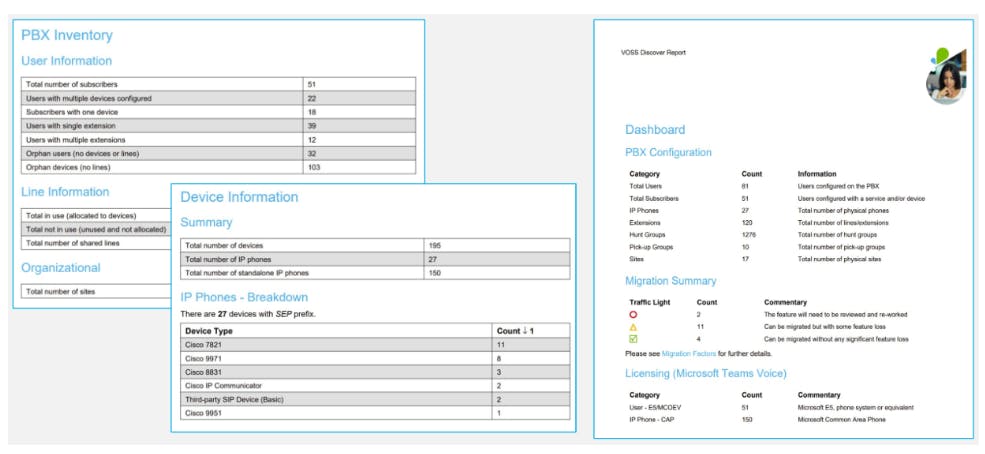
The migration reports can be used to identify numbers and devices in use and those that can possibly be “trimmed” before migration to reduce complexity and costs.
Data in VOSS Discover is stored in a SQL database which allows large amounts of data from many PBXs to be stored, normalized, and filtered. Ad-hoc queries can quickly be executed across all of the consolidated PBX data in order to better plan for a migration to Teams Phone.
One of the key capabilities that VOSS Discover provides is help in creating a unified dial plan within Teams Phone; this is especially important if multiple PBXs with different number or extension ranges are being consolidated into a single Teams tenant.
Teams Feature Mapping and Obstacle Identification
Sometimes you know where you want to go, however this does not mean you won’t encounter obstacles. In Star Trek: Discovery season 4, episode 10, Captain Burnham and her crew need to cross the Galactic Barrier to try and prevent the destruction of Earth and the Vulcan planet of Ni’Var. The destination is known; the path is unclear.
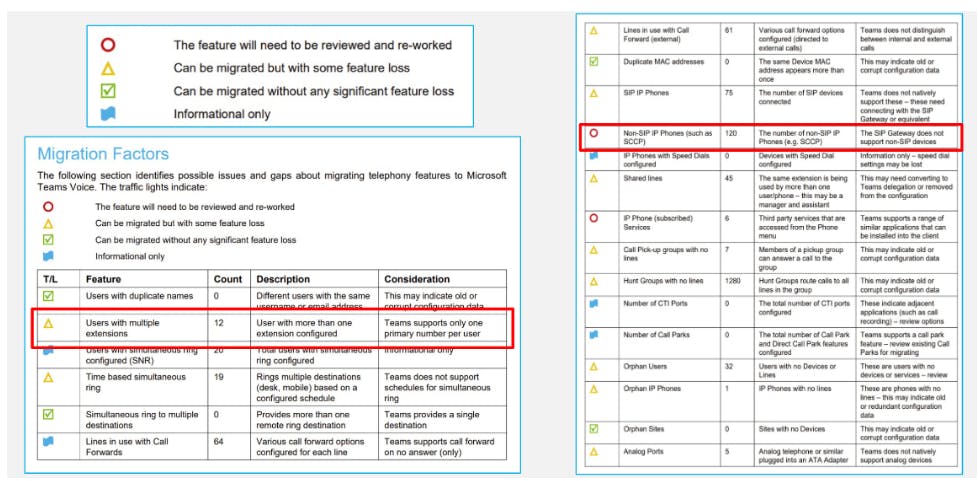
One of the VOSS Discover features I like best is the “Migration issues” report. This report clearly identifies potential and significant current configuration issues that will need to be addressed as part of your migration to Teams Phone.
For example, in the example shown below, 12 users have been assigned multiple extensions/numbers. Teams supports only one primary number per user, although a user can also have a private line and there are some workarounds.
The example also highlights a more critical 120 non-SIP devices. Note: SCCP phones run a proprietary Cisco protocol (Skinny Call Control Protocol) as opposed to SIP. Depending on your CallManager and device versions, some of these devices could be converted to using SIP and connected to Teams using the SIP Gateway.
The key is that the migration report flags issues so you can plan an approach ahead of a migration and thus avoid negative customer impacts.
Boldly Go
For many organizations, Microsoft Teams Phone provides improved communication and collaboration capabilities, often with a lower total cost of ownership.
VOSS Discover is one tool that can make planning the journey easier.
And when you are ready to “engage” either your warp drive (or your spore drive), VOSS Migrate automates the migration lifecycle based on the “sensor data” VOSS Discover provided, but let’s save the details for the next episode.
Engage!
Keep up to date with our latest blogs and subscribe today