
Discover the hidden costs around UC cloud systems
Streamline license costs whilst delivering exceptional user experience with VOSS

Author: Tim Jalland
Solution Manager, VOSS Solutions
Tuesday January 30, 2024
Tackling the hidden cost burden around UC licensing
Investment in UC and collaboration systems continues unabated, enabling the productivity of flexible, remote, and agile workforces. The underlying systems such as Microsoft Teams, Cisco Webex, and others, continue to advance in sophistication with new features, capabilities, and most recently AI. Alongside this, multiple levels and options for licensing make it difficult for organizations to track and tackle what is becoming an increasingly large monthly operating expense.
What costs are we talking about?
Licensing for a UC service delivering chat, a meeting, document sharing, compliance, and calling, comes in various shapes and sizes. Using Microsoft Teams as an example, the “per user” monthly charge can range anywhere between $20 and $100, and for many enterprise organizations, it sits at around $40. If you have a workforce of 10,000 users that’s close to half a million dollars spent every month – so saving 15% (which isn’t unreasonable) can deliver significant cost savings without impacting performance or user experience.

Where do licensing costs come from?
For many customers, the core functionality on Microsoft Teams is delivered from either an E3 or an E5 license, retailing at $23 and $38 per user per month respectively. Enterprise agreements and discounting will reduce this, but it’ll still be a significant monthly cost. Added to this are add-on applications and capability – for example the Teams Premium license, most recently Co-Pilot, and third-party applications to meet specific business needs. These range anywhere from $10 upwards (Co-Pilot retailing at $30). A subset of users will require full calling onto the public telephone network. That draws in charges from a suitable operator ($5 – $10 for Operator Connect) or from Microsoft directly ($12 for domestic calling and $24 for International). Finally, ad-hoc user offboarding or migration processes often mean that users are charged for the cloud but also retain licenses on existing telephony platforms, from the likes of Cisco and Avaya – pulling in unnecessary costs of $5 – $15 per user.
At the extreme, that full license stack totals $104 per user per month. What’s more, tracking license allocation against the various user personas and requirements, across the various components in the system, is an arduous task that isn’t well supported by the native vendor tools. License costs grow and become a hidden cost and burden on every customer’s operating budget.
What to expect
If you budget on average for $40 per user per month on UC licensing, that covers users on simpler plans ($20) all the way through to power users on the full stack at $100. With an investment in tooling, you should be able to trim back 15% on license charges, without impacting user experience or performance. For a 10,000 user organization that’s $60,000 per month or $720,000 over the year – so significant.
- 10,000 users * $40 * 15% = $60,000 per month
Taking steps to manage licensing in a UC environment
License costs (obviously) accumulate through assignment but there are steps that can be taken to trim back.
- The place to start is validating business and user needs vs. license plans
- Next, monitor and manage premium licenses (E5) and license add-ons
- Then, review calling and telephony needs
- Identify guest users and inadvertent license assignments
- Regularly check on in-active or previous-employee accounts
- Finally, consolidate older telephony platforms or at least review redundant licensing
Moving to annual costs and enterprise license agreements also pull in discounts.
Does this sound simple? Unfortunately, not. It can become a daunting task alongside your organization’s day-to-day activity, the cycle of employees changing roles and onboarding and offboarding users, and the limited visibility provided by native vendor tools. Licensing each individual makes licensing hard to track, licensing by groups makes this simpler and more transparent, but there’s a case for investing in tooling to track, optimize and streamline license costs.
Investing in tools to reduce costs
This might sound contradictory, but it’s not! Tool sets provide better visibility into licensing costs, tracking usage across several components with a goal of aligning licensing against need, and reducing any over-licensing. Tool sets provide:
- A single point to track assignment and usage across multiple components
- Consolide and interpret information, with costs, to provide a budgeting dashboard, with the ability to drill down into any detail
- A more proactive approach, identifying areas for cost savings
- History and trending over a period of time (at least 180 days)
- Integration into existing budgeting and charging business processes
- Automatic discovery of users, assets ,and licensing across the network
- Streamline both user onboarding (ensuring the correct license package is assigned based on user persona or role) and offboarding (ensuring licenses are correctly freed up after a user leaves the organization)
- Audit existing deployments, including legacy PBX systems, identifying and removing ‘already-left’ users, migrated accounts, and guest accounts
- Deliver trend and usage patterns that can feed directly into capacity and budgeting processes
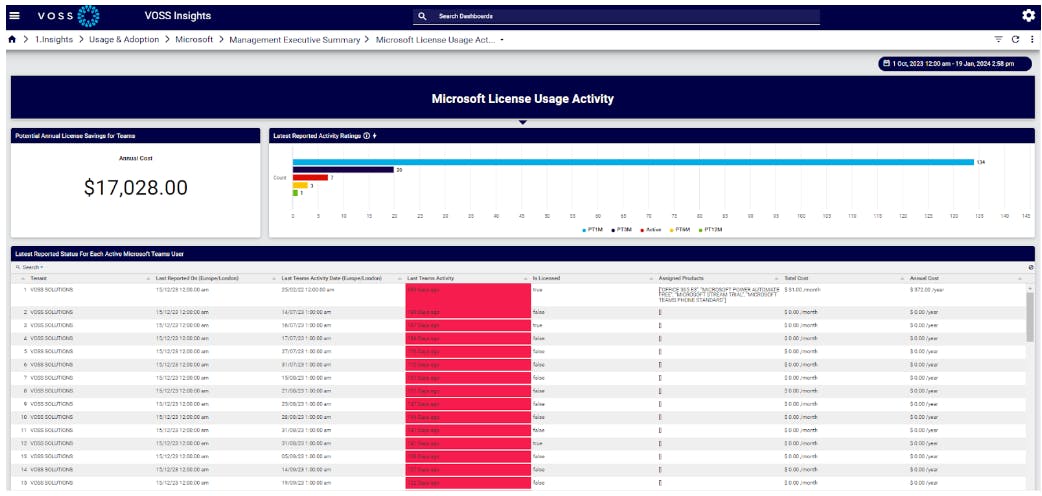
I’ve included below a sample budgeting dashboard, taken directly from VOSS Insights.
Keep up to date with our latest blogs and subscribe today