SOLUTION SHEET
VOSS for Healthcare
Turbocharging Microsoft 365 for healthcare
Healthcare is leading the way in adopting technology to transform and enhance patient care. Its strategic priorities include enabling secure digital collaboration, strengthening data governance, streamlining and automating processes, supporting data-driven decision-making, and building scalable IT infrastructure to meet future demands.
A core pillar behind the transformation in healthcare is Microsoft 365, which offers a range of workplace applications and capabilities that are securely delivered from the cloud.
Microsoft 365 comes with its own set of management tools – administration portals, PowerShell scripts and Power BI dashboards. However, larger healthcare organizations present unique challenges in security, compliance, and operational efficiency that need more comprehensive management solutions that get the very best out of Microsoft 365.
VOSS, in partnership with Microsoft, empowers healthcare organizations to maximize the value of Microsoft 365 by addressing security, compliance, and efficiency challenges.

Aligning with strategic priorities in healthcare
VOSS for Microsoft 365 aligns with the strategic goals for healthcare and offers centralized management, automation, and analytics capabilities that support digital transformation in healthcare’s complex IT environments.
1
Digital Transformation
Empowering staff with modern tools and platforms to improve patient care and operational efficiency.
2
Interoperability
Ensuring seamless integration across systems and local units to support unified collaboration and data exchange.
3
Data governance and compliance
Maintaining strict control over sensitive data and adhering to regulatory standards such as GDPR.
4
Secure collaboration
Facilitating secure communication channels for departmental, clinical, and administrative teams.
5
Scalable deployment
Supporting large-scale rollouts of Microsoft 365 services across diverse healthcare units, in a quick and efficient way.
6
Data-driven decision making
Leveraging analytics to inform policy, resource allocation, and service improvement.
Importantly, VOSS puts organizations in control of their Microsoft 365 service, without the reliance on disparate tools and portals, advanced Microsoft technical skills, ad-hoc reporting, or independent service or integration partners.
If you need it, there’s also an option to audit and migrate existing on-premises telephony systems in an automated way, to Microsoft Teams Phone.
Delivering business outcomes
With VOSS, healthcare organizations can expect:

Managing Microsoft 365 for improved outcomes

Global visibility from a single platform
A single, intuitive portal for centralized administration, analytics, and monitoring across Microsoft workloads, including Teams, Exchange, telephony, security, and beyond.

Tenant segmentation and local administration
Segment the tenant or add secondary tenants to align with organizational boundaries, providing localized administration and analytics, all controlled by advanced role-based access controls.
Licensing controls
Remove complexity and reduce costs from licensing with a global view, local allocations, visibility and controls, altering and tracking, to align capacity with usage and budgetary needs.
Automation and orchestration
Streamline service requests with intelligent automation tools, enabling service desk resources to quickly and accurately complete tickets, without the need for deep technical skills.

Monitoring and resolution
Gain real-time insights and proactively address issues with dynamic dashboards, alarms, and automated response workflows. Track service-level metrics globally and locally to maintain control.

Business analytics
Unlock actionable insights with advanced dashboards, comprehensive inventory tracking, and capacity planning tools that leverage trends and forecasts. Schedule reports in multiple formats providing stakeholders with regular updates, enabling informed decisions based on real-time data.

Business integration
Align with existing business processes and systems to deliver end-to-end automation, analytics, and reporting. Ensure seamless connectivity with robust integration, including REST API support, flow-through provisioning tied to AD, and audit logging of changes.
An overview of VOSS technology
VOSS is a versatile service management platform, well suited to largescale diverse IT estates that are spread across one or more departments or agencies. VOSS integrates securely with cloud platforms such as Microsoft 365, synchronizes with the live configuration, and provides service management through an intuitive portal.
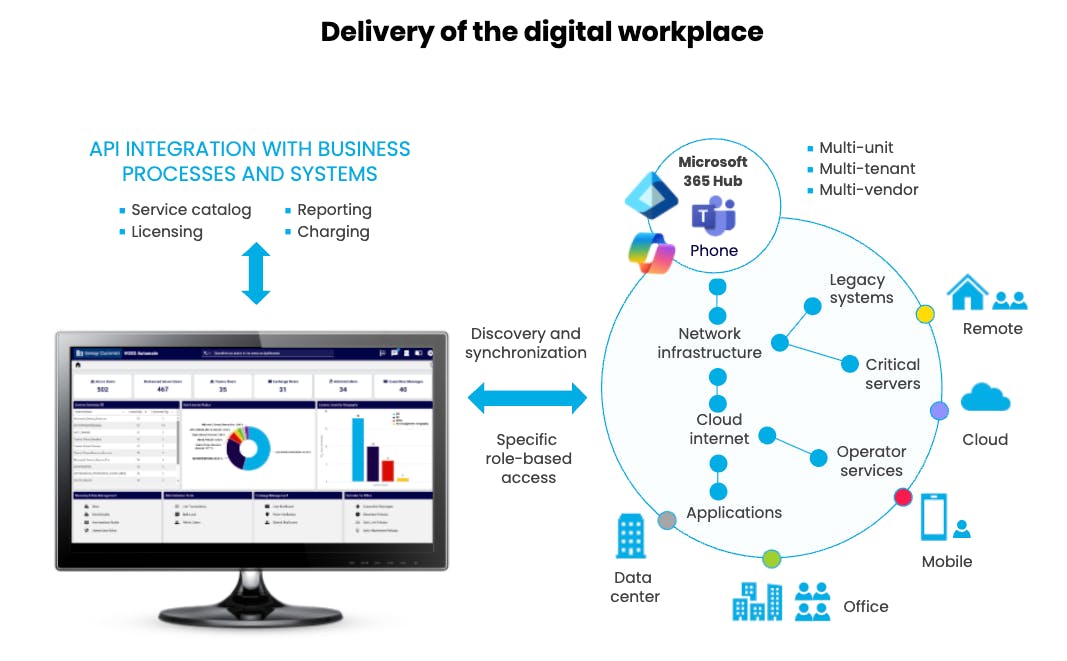
Key capabilities
VOSS provides simple and efficient management of largescale IT networks with agency self-service.
| One portal providing a single point of control | An intuitive portal for managing largescale Microsoft 365 estates, focusing on collaboration, security, telephony and multi-vendor UC services – providing a single point of control, automation, and administration. |
| Business hierarchy | Establish a top-down structure that provides a global view of agencies, intermediate nodes, and locations, enabling seamless navigation between and within different units across the service. |
| Self-service with RBAC | Delegated self-service administration with RBAC coupled with a business hierarchy, to partition the tenant and allow agencies and local regional administrators to action simple changes, subject to guardrails and access granted within their role. |
| Multi-service user view | Quickly inspect users and attached services, across and within each agency, with the ability to filter and drill down into the detail. |
| Workflow automation | Streamline regular day-to-day business and operational processes and remove manual technical steps on common service requests such as user on/offboarding. |
| Flexible service standardization | Capturing regular configuration packages or user personas into quick add groups and associated templates, that can then be applied from the automation workflows. |
| Flow-through provisioning | Automatically provision services to users based on data learned from external sources such as Microsoft Entra and active directory, thereby delivering zero-touch onboarding. |
| Rest API integration with ServiceNow | Seamlessly integrate into existing service management, business, and operational systems and processes. |
| Analytics | Inbuilt charting to visualize and track items such as users, licensing, and services, along with scheduled data exports to support charging and external reporting requirements. |
| Bulk changes | Instigated in a controlled way with tracking through formatted (readable) loader sheets. |
| Synchronization with the Microsoft Tenant | To provide a dynamic and up-to-date view of users, services, and associated devices on the estate. |
| Audit logging | Carefully track all service changes into a log for recording and audit purposes, with filters to identify selected change requests. |
| Service activity logging with dashboard | Track changes and summarize results, to identify usage patterns and for continual improvement. |
| Detailed access to all major configuration items | Made available in selected roles, to build and technical engineers. |
| Configuration flexibility | Customizable workflows to allow the service to be closely aligned with individual business needs and requirements. |
| Branding | Fully branded and configured to the local organizational needs. |
| UC management | A powerful and streamlined solution for dial plan and number management, addressing challenges that organizations face in managing complex, multi-vendor telephony environments. |
| Seamless integration | Seamless integration with Microsoft and other multi-vendor cloud environments. |
| Fully tested | Tested with the latest Microsoft PowerShell / Graph API interfaces to remove the need for deep in-house Microsoft skills, continuous development, or ongoing support. |
| Options | As an option, the ability to discovery, extract, and migrate existing on-premises PBX telephony systems to Microsoft Teams Phone. |